SAP Business ByDesign Mobile App Instructions
Prerequisites
- You will need to be changed over to SSO on your SAP account for it to work
- Link to Play Store app - https://play.google.com/store/apps/details?id=com.sap.byd.mobile.player&hl=en_US&gl=US
- Link to App Store app - https://apps.apple.com/id/app/sap-business-bydesign-mobile/id1343951881
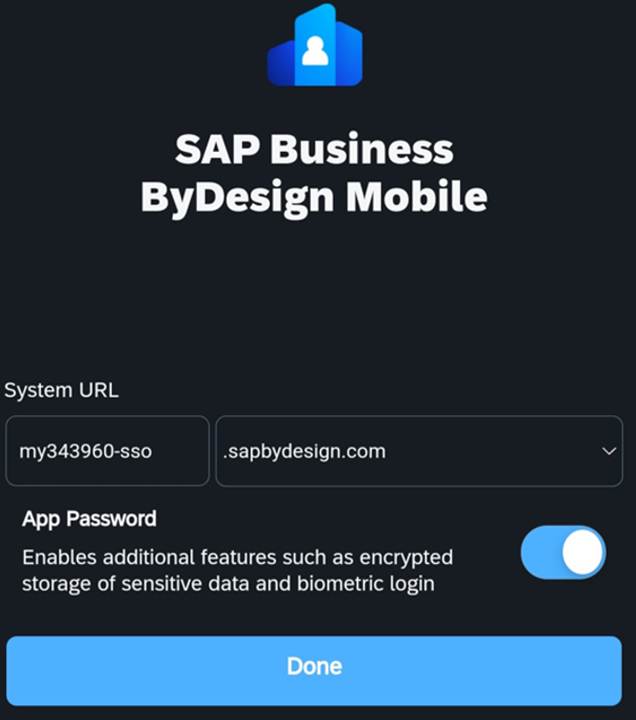
You will go into the app store/play store and download the SAP Business ByDesign Mobile App. You will then go into the app and add my343960-sso to the system URL. Click done and it will ask you to login with your O365 credentials. You can also enable app password and this will let you login with the password you make for it, this also allows you to also use fingerprint sign on as well.
From the mobile app you can access less work centers than on the website. You can still access approvals and reports though.
To approve POs you will go to the Manager Approvals tile and you can approve from there.
You can access more by going to the all apps page here (https://www.microsoft365.com/apps?auth=2&home=1 ) on your phone and clicking SAP Prod. This will pull up SAP with full access if you need to access more than the app will let you into.
Was this article helpful?
That’s Great!
Thank you for your feedback
Sorry! We couldn't be helpful
Thank you for your feedback
Feedback sent
We appreciate your effort and will try to fix the article